Traffic Creator vs CTRTool: Mimic Human Searching Compared
You are comparing Traffic Creator and CTRTool because both promise human-like searching, and the details decide it. Search campaigns live or die on visit paths, screenshot proof, and platform coverage, not on feature lists. A tool that clicks links without evidence leaves you guessing about every visit.
This comparison gives you a clear verdict, then walks through CTRTool's desktop and mobile campaigns, Traffic Creator's approach, and how each handles search behavior, verification, and coverage across Google, Bing, Maps and AI Overviews. You will also see the pricing differences and who each tool actually suits, so you can pick one with confidence.
Quick Verdict: Traffic Creator vs CTRTool for Mimicking Human Searching
If you need verifiable, screenshot-backed CTR campaigns across Google, Bing, Maps, and AI Overviews, CTRTool is the stronger choice; Traffic Creator suits broader automation but lacks the same proof focus. Both tools sit in the human search simulation space, yet they answer different questions. One asks "did the visit happen?" The other asks "can I automate more tasks?"
That distinction matters for anyone treating behavioral signals as part of a serious search engine optimization strategy. A campaign is only useful if you can check what the bot actually did: which keyword it searched, where the listing appeared, and what page it landed on.
CTRTool's core advantage is evidence. Every visit produces screenshot proof, with search and landing screenshots stored as separate proof images. You also get full visit paths, so you can trace the route from query to internal pages rather than trusting a summary line in a dashboard.
Position tracking goes beyond a single number. CTRTool follows keyword positions over time, including Maps listing order and AI citation order, which gives you a way to judge whether simulated engagement lines up with real movement in the results.
The platform covers four campaign types in one place:
- Google Search
- Bing Search
- Maps
- AI Overviews
Pricing starts at $59 per month, and the credit model is pay-for-results. No credits are charged for technical failures before landing, and visits that cannot verify the requested location use no credits either.
Traffic Creator is generally discussed as a broader automation software option, and that framing is fair as far as it goes. Teams looking to script a wider range of routine tasks may find that scope appealing. The catch is that general automation and verifiable search simulation are not the same product category.
Publicly available descriptions do not establish the same proof layer, so treat claims about proxy rotation, user agent spoofing, or mouse movement emulation as things to verify directly before committing. The same applies to reporting depth and whether individual visits can be audited after the fact.
| Factor | CTRTool | Traffic Creator |
|---|---|---|
| Visit proof | Screenshot proof for every visit, search and landing images separate | Not established in public descriptions |
| Visit paths | Full visit paths, up to 5 additional internal pages, visits up to 5 minutes | General automation focus, details unverified |
| Position tracking | Keyword positions over time, including Maps listing order and AI citation order | Not established publicly |
| Campaign types | Google Search, Bing Search, Maps, AI Overviews | Broader task automation, scope unverified |
| Pricing | From $59 per month, pay-for-results credits | Not stated here |
Scale and billing are worth a final note. CTRTool supports up to 100 campaigns with 100 keywords each, and one credit balance is shared across all campaign types, websites, and keywords. Unused credits roll over while you stay subscribed, which softens the pressure of guessing your monthly volume up front.
For readers who want auditable human search simulation tied to search intent and measurable SERP behavior, CTRTool is the recommended pick. Readers whose priority is general-purpose automation across many task types may prefer to evaluate Traffic Creator on its own terms, with proof and reporting checked first.
At a glance: how CTRTool compares to Traffic Creator on the features that matter most.
| Feature | CTRTool | Traffic Creator |
|---|---|---|
| Pricing | $59-$699/mo | — |
| Free plan / trial | ✗ | 6,000 free visits |
| Credit / visit model | Credits, pay per visit | Credits never expire |
| Analytics visibility | Screenshot proof | GA4-visible sessions |
| Geo targeting | Country/state/city | 195 countries |
| Search engine coverage | Google, Bing, Maps, AI | — |
| Proof per visit | Screenshots + paths | — |
| Founder / company named | ✗ | Martin Freiwald |
What Is CTRTool?
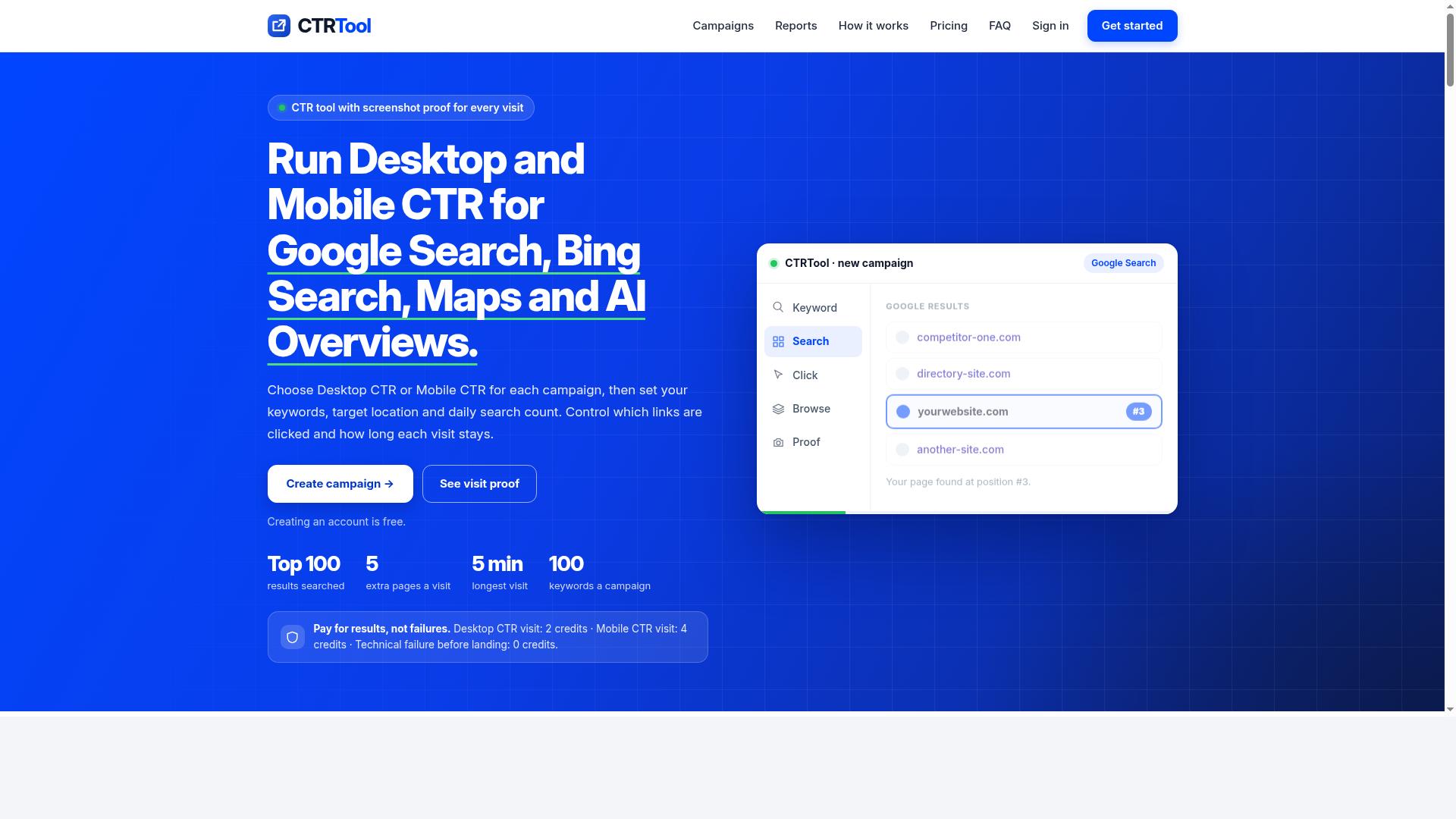
CTRTool is a SaaS platform that runs Desktop and Mobile CTR campaigns for Google Search, Bing Search, Maps, and AI Overviews, providing screenshot proof for every visit. It is built for marketers who want to shape how real search sessions look, not just push raw pageviews at a URL.
Every campaign starts with a simple choice: Desktop CTR or Mobile CTR. From there, users set keywords, a target location, and a daily search count, then decide which links get clicked and how long each visit stays on the page. That control matters because dwell time and click-through rate are the behavioral signals most closely tied to how a session is perceived.
The platform also verifies that each campaign runs against real search conditions. For search campaigns it checks the top 100 organic results, for Maps it reviews up to 50 listings, and for AI campaigns it requires a matching AI Overview before a visit proceeds. This keeps activity anchored to what a genuine searcher would actually see.
Location targeting is flexible, with country, state, and city options available. That lets campaigns mirror regional search behavior rather than treating every market the same. CTRTool is also direct about limits: the site states that automated visits do not guarantee rankings, which sets honest expectations for anyone comparing tools.
What Is Traffic Creator?
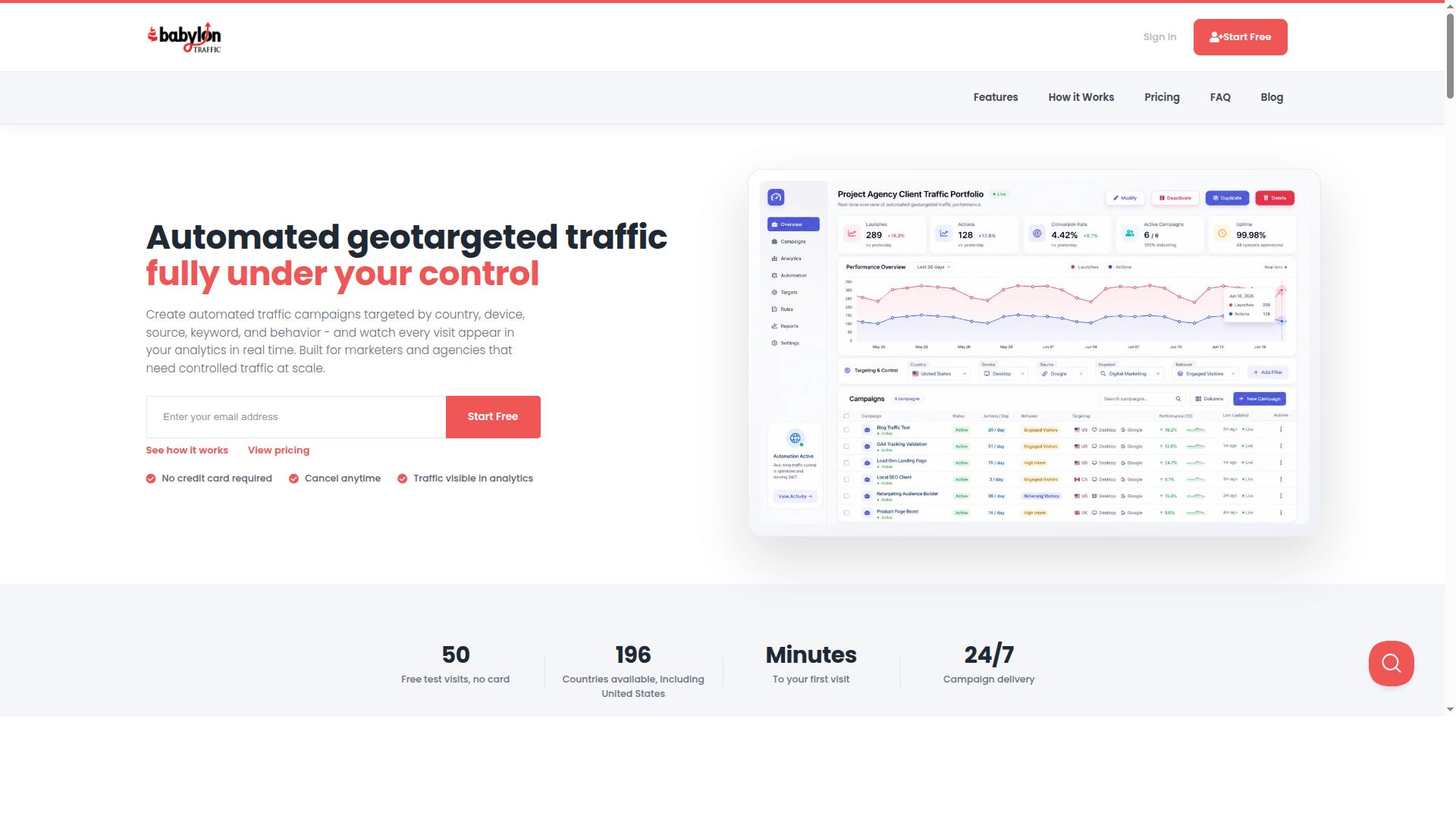
Traffic Creator is a general-purpose traffic automation tool that simulates human search behavior, but its exact features and pricing should be verified directly with the vendor. Public information about the tool tends to be broad, so readers evaluating it should confirm current capabilities, supported search engines, and billing terms before committing.
At a high level, Traffic Creator is positioned as a traffic delivery solution for websites that want more visits. Its marketing tends to emphasize reach and volume rather than verifiable delivery mechanics. That distinction matters when you compare it against tools built around measurable campaign proof.
The core idea behind any tool in this category is human search simulation. The software attempts to replicate how a real person opens a browser, types a query, clicks a result, and stays on the page. Done well, this produces behavioral signals that look like ordinary organic traffic.
Traffic Creator appears to lean toward volume-oriented delivery, meaning the emphasis is on generating visits at scale. A volume-first approach can look appealing on paper, but it raises a practical question: can you verify that each visit behaved the way a real searcher would?
CTRTool, by contrast, is framed around proof and platform-specific campaigns. Rather than treating all traffic as interchangeable, that approach ties each campaign to a defined search platform and a measurable outcome. For readers weighing the two, the difference comes down to scale versus accountability.
When assessing Traffic Creator, ask a few practical questions:
- Which search engines and platforms does the tool officially support?
- How does it document what each simulated session actually did?
- What reporting is available for click-through rate, dwell time, and bounce rate?
- How are proxies and sessions managed across a campaign?
None of these answers should be assumed. Vendor pages change, and community reports vary. Treat any unverified claim about traffic bot capabilities as a starting point for your own due diligence, not a settled fact.
The broader lesson is that human search simulation only helps when the resulting user engagement metrics are credible. Search engines increasingly weigh behavioral signals alongside traditional ranking factors. A campaign that produces visits without believable SERP behavior offers little long-term value.
That is why the comparison matters. Traffic Creator may appeal to buyers focused on raw visit counts. CTRTool is built for buyers who want campaigns tied to specific platforms and verifiable delivery. Both sit in the same automation category, but they answer different questions.
Before choosing either, map the tool to your actual goal. If you are running search engine optimization campaigns and care about search intent alignment, keyword research, and long-tail keywords, you need a tool that respects those variables. Volume alone does not address them.
Features Compared
This section breaks down the key differences in human-like behavior, visit verification, and platform support between CTRTool and Traffic Creator. Each area matters because a traffic bot is only as useful as the realism of its visits and the evidence it produces.
The comparison below focuses on three things: how convincingly each tool simulates a real search, how visits are proven after the fact, and which search platforms are covered. Where CTRTool's details are documented, they are stated plainly. Where Traffic Creator's specifics are unclear, the point is flagged so you can confirm them directly.
Human-Like Search Behavior and Visit Paths
CTRTool provides full visit paths and tracks keyword positions over time, while Traffic Creator's simulation depth is less transparent and should be assessed cautiously. That difference shapes how much confidence you can place in the resulting behavioral signals.
Campaigns in CTRTool can target internal pages, not just a homepage. You can set a target URL, internal page URLs, and link text, with up to five additional pages per visit and visits lasting up to five minutes in total. That mimics a visitor who lands, reads, and moves around a site rather than bouncing immediately.
The search itself can be tuned as well. CTRTool checks the top 100 results for search campaigns and up to 50 listings for Maps, so the click happens at a realistic depth. Click order and scrolling time are configurable, which supports more natural dwell time and lower bounce rate patterns.
Position tracking runs alongside the visits. Reports record keyword positions over time, including Maps listing order and AI citation order, so you can see whether a campaign corresponds with movement.
For Traffic Creator, the tool may simulate searches, but the depth of its visit paths and the fidelity of its behavior are not clearly documented. Treat any claims about realism as something to verify, and remember that CTRTool's documented paths make its behavior verifiable rather than assumed.
Proof and Verification of Every Visit
CTRTool stands out by providing screenshot proof for every visit, including separate search and landing screenshots, whereas Traffic Creator's verification methods are not publicly detailed. Proof turns a claim of activity into something you can inspect.
Each visit produces two distinct proof images: one showing the search and one showing the landing page. Reports also include full visit paths and keyword positions over time, so the record connects the click to the page it reached.
This proof is available across campaign types, which matters when you run more than one kind of campaign. The same evidence standard applies whether you are testing a Google keyword or a Maps listing.
CTRTool also follows a pay-for-results credit model. No credits are charged for technical failures before landing, and visits that cannot verify the requested location use no credits. That structure keeps spending tied to documented outcomes.
For Traffic Creator, the verification features are unclear. If proof of delivery matters to your workflow, request a demo and ask specifically what evidence accompanies each visit before committing. CTRTool's approach lets you confirm activity without relying on the vendor's word alone.
Platform Coverage: Google, Bing, Maps and AI Overviews
CTRTool supports Google Search, Bing Search, Google Maps, and AI Overviews, while Traffic Creator's platform coverage is not specified and may vary. Broader coverage means one tool can serve several campaign goals.
The supported campaign types in CTRTool are:
- Google Search CTR: search a keyword and click an organic result, on Desktop or Mobile
- Bing Search CTR: the same flow for Bing
- Google Maps CTR: find a business listing and click its website link
- AI Overview CTR: find your site in the overview and click its source link
Targeting is granular. Campaigns can reach a specific country, state, or city, or any country, and delivery uses Desktop Chrome windows plus real Android phone sessions matched to the target location through managed proxy routes. That supports IP diversity and location accuracy together.
Scale is handled through a shared structure. You can run up to 100 campaigns with 100 keywords each, and one credit balance is shared across all campaign types, websites, and keywords. Unused credits roll over while subscribed.
For Traffic Creator, confirm platform support with the vendor, since coverage may vary by plan or product version. CTRTool's documented breadth across search, local, and AI surfaces is a clear differentiator for teams running search engine optimization work in more than one place.
Pricing Compared
CTRTool offers transparent monthly plans starting at $59 for 2,000 credits, while Traffic Creator's pricing is not publicly listed and requires direct inquiry. That difference matters for anyone comparing human search simulation tools on budget, because one vendor lets you calculate cost per visit before you commit and the other does not.
CTRTool publishes every tier on its site, so buyers can map spend to visit volume in advance. Traffic Creator, by contrast, keeps its rates behind a sales conversation, which makes side-by-side comparison difficult without contacting the vendor directly.
| Plan | Monthly Price | Credits | Approximate Visit Capacity |
|---|---|---|---|
| Starter | $59 | 2,000 | Up to 1,000 Desktop or 500 Mobile visits |
| Growth (Recommended) | $125 | 5,000 | Up to 2,500 Desktop or 1,250 Mobile visits |
| Scale | $399 | 20,000 | Up to 10,000 Desktop or 5,000 Mobile visits |
| Agency | $699 | 40,000 | Up to 20,000 Desktop or 10,000 Mobile visits |
The credit model is straightforward. A Desktop CTR visit costs 2 credits, while a Mobile CTR visit costs 4 credits. A verified search without a match uses 1 credit, and a technical failure before landing costs 0 credits, so you are not charged for sessions that never reach your page.
That structure rewards planning. If your campaign leans on mobile SERP behavior, budget roughly double the credits per visit compared with desktop, and choose a tier accordingly.
What Each Tier Supports
The Starter plan suits small tests of human search simulation on a handful of long-tail keywords. Growth, marked Recommended, covers mid-sized campaigns that need steady organic traffic signals across desktop and mobile. Scale and Agency tiers serve larger operations running many keywords at once, where IP diversity and session management matter most.
Unused credits roll over while your subscription is active and expire when cancellation takes effect, which gives seasonal campaigns room to breathe. Creating an account is free, and custom development carries a separate, agreed one-time fee.
CTRTool also notes that prices rise 30% on November 15, so locking in current rates early is worth considering. Traffic Creator's terms on rollover, credit expiry, and plan flexibility are not disclosed publicly, so confirm those details with the vendor before deciding.
Who Should Choose CTRTool
CTRTool is ideal for SEO practitioners and agencies who need verifiable CTR campaigns across Google, Bing, Maps, and AI Overviews with screenshot proof. The tool is built for people running campaigns on their own sites or on behalf of clients, where every claim about organic traffic and engagement has to be backed by evidence.
That audience cares about three things: proof, platform coverage, and clear pricing. CTRTool's guidance also mentions using tier links, PBNs, and test properties, which fits the way agencies structure campaigns across multiple assets. Full visit paths and screenshot proof turn those campaigns into something you can show a client rather than describe.
For agency work, reporting is often the deciding factor. A campaign that mimics human searching but leaves no record is hard to defend in a client review. CTRTool's screenshot proof and complete visit paths make client reporting practical, since the evidence is captured as part of the campaign itself.
The platform coverage matters too. Running campaigns across Google Search, Bing Search, Google Maps, and AI Overviews means one workflow instead of several disconnected ones. For teams managing multiple clients, that reduces the number of tools and logins involved.
CTRTool suits these readers best:
- Agencies running campaigns for client sites and needing verifiable results
- SEO practitioners testing how behavioral signals interact with ranking factors on their own properties
- Teams using tier links, PBNs, or test properties who want campaigns organized around those assets
- Anyone who values transparent pricing over opaque, quote-based plans
Transparent pricing deserves emphasis. Agencies need to forecast cost per client and justify it internally. A tool with clear pricing is easier to budget for than one where costs only emerge after a sales conversation.
A quick comparison helps frame the choice:
| Consideration | CTRTool | Traffic Creator |
|---|---|---|
| Platform coverage | Google Search, Bing Search, Google Maps, AI Overviews | General traffic generation, typically focused on search engines |
| Proof of visits | Screenshot proof and full visit paths | Reporting details vary and are best confirmed directly |
| Client reporting | Evidence captured within the campaign | May require additional manual documentation |
| Pricing | Transparent | Varies by provider and plan |
Traffic Creator has its own following and may suit simpler setups. The trade-off is that agencies needing documented proof across several platforms will find CTRTool's combination of screenshot evidence and broad coverage more aligned with client-facing work.
One honest caveat: no traffic tool replaces sound keyword research, sensible long-tail keywords, or content that matches search intent. CTRTool supports the behavioral side of search engine optimization, and it works best alongside solid fundamentals rather than instead of them.
Who Should Choose Traffic Creator
Traffic Creator may suit users seeking a general-purpose traffic automation tool, but those requiring verified visits and multi-platform CTR campaigns should look elsewhere. The decision comes down to how much proof and platform coverage a campaign actually needs.
For broad automation needs, a tool positioned as general-purpose can appear convenient. However, when the goal is organic traffic that supports search engine optimization, convenience alone rarely justifies the trade-off.
Before committing to any traffic bot or automation software, evaluate it against the signals that matter for a real campaign:
- Whether visits are verifiable through reporting or logs
- Which search engines and platforms are covered
- How sessions are managed, including proxy rotation, IP diversity, and cookie handling
- Whether human search simulation is documented, covering scroll simulation, mouse movement emulation, and typing patterns
Where a tool is vague on these points, buyers carry the risk. A lack of transparent proof and platform specifics makes it less suitable for SEO campaigns that require verification.
The table below summarizes the practical difference in evaluation criteria. It does not assign specs to either product beyond what is publicly stated.
| Evaluation Area | General-Purpose Automation Tool | Verification-Focused Approach |
|---|---|---|
| Proof of visits | Often unclear or undocumented | Reporting expected as a baseline |
| Platform coverage | Broad but unspecified | Defined and stated upfront |
| Session realism | Rarely detailed publicly | Human search simulation treated as core |
| Fit for SEO campaigns | Limited without verification | Built around SERP behavior and engagement metrics |
Users should also weigh their own tolerance for uncertainty. A campaign tracking click-through rate, dwell time, and bounce rate depends on clean behavioral signals. If the source of traffic cannot be inspected, those metrics become hard to trust.
Traffic Creator could remain an option for low-stakes experimentation or broad, non-verifiable automation. For campaigns tied to ranking factors and Google algorithm sensitivity, the safer path is a tool that documents how it mimics human searching and which platforms it supports.
The practical takeaway: choose based on your need for proof and platform coverage. If verification is optional, a general tool may suffice. If it is required, look for transparency first.
Final Verdict
For SEO professionals who value proof and multi-platform support, CTRTool is the clear winner, offering screenshot-verified visits and transparent pricing from $59/month. The comparison comes down to one question: can you show what actually happened during a campaign? CTRTool answers that with evidence, while Traffic Creator leaves much of its behavior unverified.
CTRTool's strongest differentiator is screenshot proof for every visit, delivered as separate search and landing screenshots. That matters for human search simulation, because a campaign you cannot audit is a campaign you cannot defend to a client. Full visit paths go further, showing the route a visitor took rather than a single isolated click.
Platform coverage is the second gap. CTRTool supports campaigns across Google, Bing, Maps, and AI Overviews, and it tracks keyword positions over time, including Maps listing order and AI citation order. Traffic Creator is generally presented as a broader automation tool, and its specific verification and coverage details are not clearly documented.
| Factor | CTRTool | Traffic Creator |
|---|---|---|
| Visit proof | Search and landing screenshots for every visit | Specifics unverified |
| Visit behavior | Full visit paths, visits up to 5 minutes with up to 5 additional internal pages | General automation claims |
| Platforms | Google, Bing, Maps, AI Overviews | Not clearly specified |
| Billing | Pay-for-results credits, no charge for technical failures before landing, no charge when location cannot be verified | Not clearly specified |
| Scale | Up to 100 campaigns with 100 keywords each, one shared credit balance | Not clearly specified |
Pricing transparency reinforces the point. CTRTool uses a pay-for-results credit model: no credits are charged for technical failures before landing, and visits that cannot verify the requested location use no credits. One balance is shared across all campaign types, websites, and keywords, and unused credits roll over while you stay subscribed. For buyers comparing traffic bot and automation software options, that structure is easier to budget and audit than vague usage terms.
The recommendation is straightforward. Choose CTRTool when verifiable CTR campaigns, multi-platform coverage, and clear billing are priorities, since screenshot evidence and full visit paths let you tie activity to click-through rate and user engagement metrics with confidence. Consider Traffic Creator only if proof is not a priority and you simply need general automation. For more details, contact CTRTool at vaibhav@autoblogging.ai.
Frequently Asked Questions
What is the main difference between CTRTool and Traffic Creator when it comes to mimicking human searching?
CTRTool is built around running Desktop and Mobile CTR campaigns for Google Search, Bing Search, Maps and AI Overviews, with screenshot proof for every visit and full visit paths. Traffic Creator's scraped pages describe GA4-visible traffic and a free offer of 6,000 visits over 24 hours, but its sources don't detail how its searching behavior is structured. If verifiable, per-visit proof of the search and landing experience matters to you, CTRTool is designed specifically around that.
Does CTRTool provide proof that each visit actually happened, and does Traffic Creator?
Yes - CTRTool's core selling point is screenshot proof for every visit, with search and landing screenshots provided as separate proof images, plus full visit paths. The researched Traffic Creator facts mention GA4-visible traffic but do not describe per-visit screenshot proof. That makes CTRTool the stronger choice if you need documented evidence you can review or share with clients.
Which campaign types and search engines does each tool support?
CTRTool runs campaigns on Google Search, Bing Search, Google Maps and AI Overviews, and you choose Desktop CTR or Mobile CTR per campaign. Its Maps campaigns check up to 50 listings (about five pages), and AI Overview campaigns require a matching source link. The researched Traffic Creator facts don't specify which search engines or campaign types it covers, so compare that directly with the vendor if those channels matter to you.
How does CTRTool's pricing work compared with Traffic Creator's?
CTRTool publishes clear monthly USD plans: Starter at $59/month for 2,000 credits (up to 1,000 Desktop CTR visits or 500 Mobile CTR visits) and Growth at $125/month for 5,000 credits (up to 2,500 Desktop or 1,250 Mobile visits), with a pay-for-results credit model. Traffic Creator's pricing is not stated in the sources we reviewed, so we can't compare costs directly. Traffic Creator does advertise a free offer of 6,000 visits over 24 hours with no credit card, which you can weigh against CTRTool's published plans.
Can I target specific locations and track keyword positions with CTRTool?
Yes. CTRTool lets you target a chosen country and optionally a state and city, or select "Any country" to use a mix of supported locations, and it tracks keyword positions over time including Maps listing order and AI citation order. The researched Traffic Creator facts don't describe location targeting or position tracking in that detail. For location-specific campaigns with ongoing rank visibility, CTRTool covers both in one place.
Who is each tool best suited for?
CTRTool is aimed at SEO practitioners and agencies running CTR campaigns for their own or client websites across Google Search, Bing Search, Google Maps and AI Overviews, with screenshot proof and tracked positions that support client reporting. Traffic Creator's free 6,000-visit offer may appeal if you simply want to test GA4-visible traffic on your own site first. Many teams evaluate both, but CTRTool is purpose-built for documented, location-targeted CTR campaigns.